
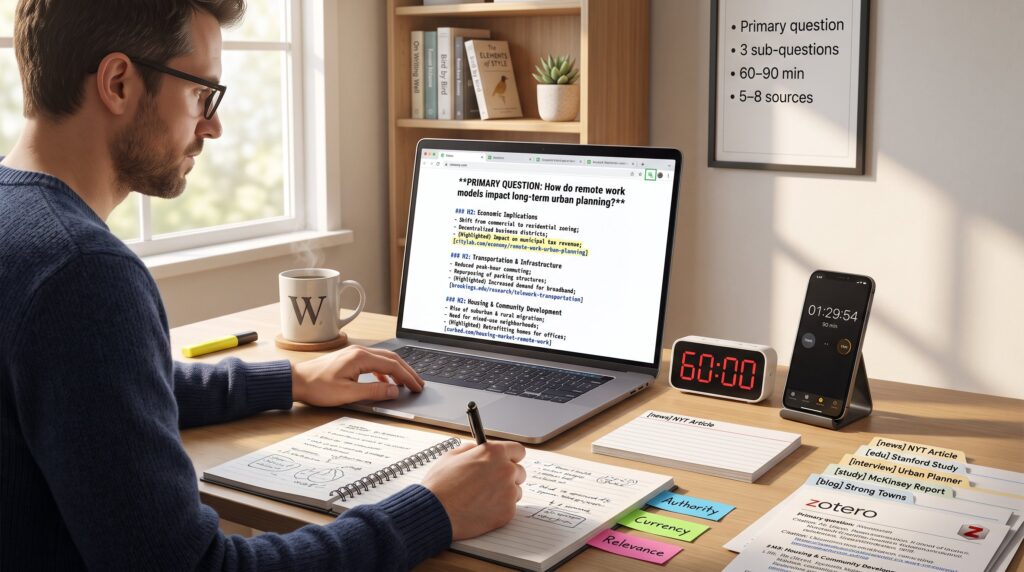
How to research a blog post without getting overwhelmed starts with a single clear question and a short timebox. The writer identifies one primary question the post will answer, three tight sub-questions, and a 60–90 minute research limit. This reduces scattered searching and the urge to chase every shiny statistic. The rest of this guide gives a compact framework: pick sources fast, vet them with a few sharp criteria, capture only what’s useful, and turn findings into an outline that writes itself.
Key Takeaways
- Start your blog post research with one clear primary question and 3–5 sub-questions to stay focused and avoid overwhelm.
- Limit your research time to 60–90 minutes and restrict sources to 5–8 reputable and specialized ones for efficiency.
- Use simple criteria like authority, purpose, currency, accuracy, and relevance to quickly evaluate source credibility.
- Organize your notes by article headings and tag key points to speed up drafting and reduce editing time.
- Convert your research questions into an actionable outline with 2–3 strong sources per section to streamline writing.
- Following a structured plan significantly reduces stress and transforms research into a predictable, manageable process.
Plan Your Research With A Clear Goal And Scope
Start with the fact: a defined goal halves wasted time. First, state one clear primary question the blog post will answer (for example: “How can parents research screen-time rules for teens?”). Then list 3–5 sub-questions that break that goal into bite-sized needs: definitions, recent data, expert positions, and practical steps.
Set explicit limits. Decide a research window (60–90 minutes) and a source cap (5–8 core sources). Those limits force prioritization and stop the rabbit hole effect. Decide format before deep research: how-to, checklist, or comparison. Format choice changes what counts as useful evidence.
Practical checklist for this step:
- Primary question (one sentence).
- Three sub-questions.
- Timebox (start/end times).
- Max sources number.
- Final format decision.
A brief human note: one writer tried open-ended research and collected 47 tabs in three hours. When they switched to this plan, they finished a publish-ready draft in 3.5 hours and reduced editing later. For beginners, pairing this step with a short getting-started resource helps, see the getting started guide for setup tips and publishing basics.
Use Efficient Source Selection: Where To Look First
Answer first: start with reputable overviews, then add niche specialty sources. Begin research at high-quality overviews, major news outlets with clear bylines, .edu/.gov pages, and professional organizations, because they offer tested summaries and vetted facts. After that, pick 2–3 specialized sources such as niche blogs, trade magazines, or expert interviews to add depth and examples.
Use search tricks to narrow results quickly. Site-specific operators like topic site:.edu or topic site:.gov bring authoritative pages to the top. Combine the timebox with a rule: spend no more than 25% of research time on overviews: the rest on specialized sources. This prevents over-dependence on a single source type.
Writers who want concrete prompts can start with three slots: one authoritative overview, one specialist article, and one primary-source or interview quote. That three-slot rule gives balance while keeping the source count low.
Nearby resources that help new writers find topics and structure include a short collection of starter prompts and a method for turning topics into outlines. For fresh prompts, consult the post ideas page. For turning chosen sources into headings, see the article outline method.
Quick Criteria To Evaluate Source Credibility
Fact first: use five fast checks, Authority, Purpose, Currency, Accuracy, Relevance. These mirror CRAAP/CARS but in a checklist that takes under a minute per source.
How to apply each check:
- Authority: Is an author named? Are credentials shown (PhD, practitioner role, institutional affiliation)? If the author is anonymous and the claim is novel, deprioritize.
- Purpose: Is the page informational or promotional? Heavy ad placement or calls to buy reduce usefulness for evidence.
- Currency: Does the page show a clear publication or update date? For fast-changing topics, prefer sources within the last 2–3 years.
- Accuracy: Are claims supported by data, citations, or links to primary research? Look for numbers and original sources.
- Relevance: Does the source directly answer one of the sub-questions and match the audience (for example, parents vs. policy makers)?
A quick red-flag method: if two checks fail (no date, no author, and obvious promotional intent), skip the source. Apply these checks while clipping to keep the research stream clean.
Best Tools For Finding Reliable Information Fast
Core insight: the right tools cut search friction. Use general search plus targeted operators for orientation. For capturing and organizing, use a web clipper and a notes app with tagging. Recommended stack:
- Search: Google with site: and filetype: modifiers: Google Scholar for studies.
- Notes app: Notion or Obsidian for structured pages: Evernote or OneNote for quick clip-and-go.
- Web clippers: Evernote Web Clipper or built-in browser reading list to save snippets and the exact URL.
- Reference manager: Zotero when saving papers with full metadata.
Practical routine: open one notes page per blog post, create headings that mirror planned H2s, and paste one short bullet per source: claim, evidence line, credibility flag. That single habit converts scattered clips into ready-to-use content blocks and slashes drafting time.
Organize Notes And Clips So You Can Write Faster
Clear answer: structure notes to mirror the final article. Create one page per post with sections matching planned headings. Put each source under the section it best supports and add a single-line assessment: “Strong”, “Weak”, or “Context only.” That makes source-choice during drafting a zero-decision process.
Practical template (use bullets):
- H2 heading (sub-question)
- Source A, key claim (quote, 15 words), evidence, credibility flag
- Source B, statistic (number + year), short note on reliability
- Example, concise anecdote or case
Tagging accelerates retrieval: use tags like definition, stat, example, counterpoint. Writers who tag consistently save an average of 45 minutes per article during drafting because they stop hunting for facts.
Common mistake and fix: people clip whole articles. Instead, clip only the needed 1–3 sentences and the link. This reduces clutter and makes synthesis easier. For structured note-taking methods, simple outlining and mapping tips can help new researchers build cleaner notes quickly.
Synthesize Findings Into A Simple, Actionable Outline
Direct fact: turn questions into headings and assign 2–3 strong sources per heading. For each H2, write 3–6 bullet points that will become sentences. Each bullet should state a claim, support it with the strongest evidence (number or quote), and note the source.
Step-by-step:
- Convert the primary question into H1 and sub-questions into H2s/H3s. This creates a writing skeleton.
- For each heading, pick 2–3 top sources from your clipped notes. If a heading has weak sources, prune or merge the heading.
- Draft three short bullets per heading: topic sentence, supporting fact, short example or counterpoint.
- Assign approximate word counts to headings so the final draft stays balanced.
Example for a how-to section:
- Heading: “Set limits with teens”
- Claim: Start with shared rules and one tech-free hour nightly (source: survey, 2024).
- Evidence: 61% of parents reported easier evenings after trial.
- Example: short family agreement template.
This method avoids rewriting because each bullet already maps to a sentence. Writers who follow it find they can produce a full first draft in a single focused hour.
Conclusion
Main insight: a narrow goal, a short timebox, and a tight source cap make research manageable and faster. Two takeaways: limit sources to 5–8 and structure notes to match headings. A quick checklist to keep nearby: primary question, 3 sub-questions, 60–90 minute timer, five best sources, and a notes page organized by heading. Use those steps to turn research from an endless search into a predictable, repeatable process that speeds writing and reduces stress.