

Parents who work from home lose an average of three productive hours per day during the first week after moving due to disorganized workspaces and missing supplies. The challenge intensifies when managing both professional responsibilities and children’s routines in a new environment. Setting up a functional home office quickly becomes essential for maintaining productivity while helping the family settle in.
What Should You Prioritize in the First 24 Hours?
Establish your primary workspace before unpacking decorative items. Identify the room or area designated for your office and move essential work equipment there immediately. This includes your computer, charger, monitor, keyboard, and any tools required for your specific job function. Set up basic internet connectivity as the first technical priority, even if it means using a mobile hotspot temporarily until permanent service activates.
Clear a single surface completely—whether a desk, dining table, or kitchen counter—to serve as your temporary command center. Working parents need a defined boundary between professional and family spaces, even if that boundary is simply a cleared tabletop in a shared room. Position this workspace where you can supervise children while maintaining focus during critical work hours.
Unpack work essentials using a dedicated system
Label one box “Work Priority” before moving day and fill it with items needed within the first 48 hours: chargers, notebooks, pens, headphones, important files, and any physical materials for upcoming deadlines. Following a simple moving checklist and timeline helps ensure these essential boxes arrive with you rather than on the moving truck’s last load.
How Can You Balance Work Setup With Family Needs?
Schedule work setup tasks during natural breaks in your children’s routines. Unpack and organize office equipment while kids eat breakfast, during naptime, or after bedtime rather than attempting setup while actively managing their needs. This approach prevents the frustration of interrupted technical tasks like configuring printers or troubleshooting software.
Working parents should communicate workspace boundaries clearly from day one. Explain to children which areas are off-limits during work hours and establish visual signals—a closed door, a specific light, or even a sign—indicating when interruptions should be minimized. These boundaries protect your productivity and your children’s understanding of your availability.

Caption: Try to establish clear boundaries during your work hours.
Alt text: a mother working from home
Create interim childcare coverage
Arrange backup childcare for the first week after moving, even if you typically manage work-from-home parenting successfully. The cognitive load of organizing a new home while meeting work deadlines exceeds normal capacity. Consider hiring a local babysitter for a few hours daily, asking relatives for support, or coordinating with your partner to alternate focused work blocks.
What Technology Setup Steps Matter Most?
Test your internet connection speed and reliability before your first work deadline. Run speed tests at different times of day to identify potential issues with bandwidth or service interruptions. Position your router centrally in the home and consider upgrading to mesh WiFi if the new layout creates dead zones in your designated office area.
Set up video conferencing capabilities with proper lighting and background. Working parents often conduct virtual meetings with limited notice, making it essential to have a professional-looking setup ready immediately. Test your camera angle, microphone quality, and background appearance before joining your first post-move meeting.
Configure backup systems early
Establish backup systems for critical work functions: a mobile hotspot as internet backup, a charged laptop battery for power outages, and cloud-based file access in case local equipment fails. Keep a written list of emergency contacts—including your internet service provider’s technical support number and your company’s IT helpdesk—in an easily accessible location separate from your computer. Remote workers who maintain contingency plans for technology failures experience significantly fewer disruptions during major transitions like relocation.
How Should You Organize Physical Office Supplies?
Use vertical storage solutions to maximize limited space in a new home. Wall-mounted shelves, hanging file organizers, and desktop drawers keep essential supplies accessible without consuming valuable floor space. Working parents often need to fit office functions into multipurpose rooms, making efficient storage critical.
Group supplies by frequency of use rather than category. Keep daily items—pens, notepads, frequently referenced files—within arm’s reach. Store occasional-use supplies like presentation materials, extra printer paper, or archived documents in closets or secondary storage areas. This system reduces time spent searching for items during busy workdays.
Designate zones for different work functions
Create distinct areas within your office space for specific tasks: a primary desk for computer work, a secondary surface for reviewing physical documents, and a small zone for supplies and equipment. Even in compact spaces, these mental zones improve focus by associating each area with particular work activities.
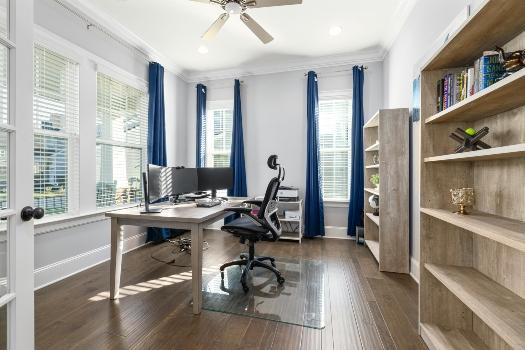
Caption: Focus on functionality of your home office setup for the first two weeks.
Alt text: A modern home office setup
What Elements of Your Office Should Wait?
Delay decorative elements and non-essential furniture purchases until core functionality is established. Many working parents waste valuable setup time arranging artwork, selecting paint colors, or shopping for the perfect desk lamp while basic work systems remain incomplete. Focus exclusively on functional elements for the first two weeks.
Postpone complex filing system setup and paper organization projects. These tasks consume hours without immediately impacting work capacity. Instead, use a simple temporary system—a single inbox for incoming papers and a basic folder structure for urgent documents—until regular work routines stabilize.
Avoid perfectionism in the initial setup
Accept that your home office will evolve over several months as you discover what works in the new space. The initial goal is functionality, not perfection. Working parents who delay work due to incomplete office aesthetics create more stress than those who begin working in imperfect but functional spaces.
How Can You Maintain Productivity During the Transition?
Communicate proactively with supervisors and clients about your moving timeline. Set realistic expectations for availability and deliverable deadlines during the transition week. Most professional contacts appreciate transparency and can accommodate temporary schedule adjustments better than unexplained delays or reduced quality.
Maintain your regular work schedule as much as possible, even if working from a temporary setup. Consistency helps children adjust to the new environment while preserving professional routines. Block specific hours for work and protect that time as you would in a traditional office setting.

Caption: Try to dedicate specific hours to work and protect that time as you would in a traditional office.
Alt text: a mother holding a toddler and writing something down in a notebook
Start Setting Up Your Home Office Today
Setting up a functional home office after relocating requires strategic prioritization rather than attempting to complete everything simultaneously. Working parents who focus on essential technology, clear workspace boundaries, and basic organization systems can restore productivity within days rather than weeks. The key lies in distinguishing between immediate functional needs and longer-term optimization projects, allowing work to continue while the new home gradually transforms into a permanent workspace.